




An SAP Business One migration usually starts with a change order. A brand adds a 3PL, opens a wholesale program, or picks up a retailer with EDI requirements, and the partner who implemented SAP B1 quotes weeks of work and a five-figure invoice to make the system reflect it. After the third or fourth round, the operations team stops asking and builds the workaround in a spreadsheet instead. By then the system of record is the spreadsheet, and SAP B1 is where the ledger lives.
That is the situation most consumer goods brands are in when they search for how to switch from SAP B1. The question is rarely whether to leave. It is what to take with you, what to leave behind, and how to avoid trading one year-long implementation for another. This guide covers why brands migrate off SAP Business One, how to decide what moves, what the migration itself involves, and where DOSS, the AI-native operations platform for consumer goods, fits for a brand that wants to keep its GL and fix its operations.
Why Do Consumer Brands Migrate Off SAP Business One?
Brands migrate off SAP Business One because the cost of changing it outruns the value of what it does. SAP B1 is a capable small-business ERP with solid financials, and for a brand with one warehouse, a few suppliers, and a wholesale-only channel it can run for years. The trouble starts when the business changes shape faster than the system can follow.
Three patterns come up repeatedly. First, every change is a project. Adding a channel, a warehouse, or a retailer-specific workflow means partner hours, testing, and a release window, and the add-ons that fill SAP B1's gaps for ecommerce, EDI, and 3PLs each come with their own vendor and sync schedule. Second, the data is stale by design. On-premise or hosted SAP B1 deployments typically sync with Shopify, Amazon, and 3PL systems on batch schedules, so inventory and order status lag the real world by hours, and operators learn to check the portal instead of the system. Third, the system was built ledger-first. SAP B1 does financials well and treats inventory, purchasing, and order orchestration as modules attached to the ledger, which is backward for a brand whose daily work is buying, holding, and selling physical product.
The result is the false choice every growing brand hits: buy another system or add headcount to keep this one honest. Both are bets that the business will stop changing, and it will not.
What Should You Move, and What Should You Keep?
The most important SAP Business One migration decision is separating the ledger from operations, because you do not have to replace both at once. Most brands that switch from SAP B1 are unhappy with how it runs operations, not with how it keeps books. Treating the migration as an operations replacement rather than a full ERP replacement shrinks the scope, the risk, and the timeline.
Start by sorting what SAP B1 does today into three buckets:
- The general ledger and financial reporting. Chart of accounts, journal entries, AP and AR aging, fixed assets, and statutory reporting. This can stay in SAP B1, or move to whatever GL finance prefers, on its own timeline.
- Operations. Item master, vendors, customers, purchasing, receiving, inventory positions and valuation, sales orders across every channel, fulfillment, and returns. This is what moves to the new platform.
- Workarounds. The spreadsheets, add-ons, and manual processes that grew up around SAP B1's gaps. These should disappear, not migrate. Write down each one and the business rule it encodes, because that rule needs a home in the new system.
The operations layer is where the migration pays off. Once procurement, inventory, and orders live on one system of record that matches the real world, the new platform hands finance clean inputs, such as journal entries, customer invoices, credit memos, and vendor bills for revenue, COGS, and inventory valuation, and the GL stays. Finance keeps its close process and its reporting; operations gets a system that reflects what is actually happening in the warehouse.
How Do You Plan an SAP Business One Migration?
A successful SAP Business One migration is a data and process project first and a software project second. The steps below are the ones that decide whether go-live is clean.
- Audit the item master. SAP B1 item masters accumulate duplicates, dead SKUs, inconsistent units of measure, and variants created for one channel. Decide on one canonical SKU per sellable item and map every alias to it: the Shopify product ID, the Amazon ASIN, the 3PL item code, and each retailer's UPC. This mapping is the foundation for everything that follows.
- Reconcile inventory before you move it. Count what you have, by location and lot, and resolve the difference between SAP B1, the 3PL portal, and the spreadsheet before cutover, not after. Opening balances in the new system should match physical reality on day one.
- Document the business rules hiding in workarounds. The approval threshold on POs, the rule for splitting an order across warehouses, the way landed cost gets allocated across a container. Each one becomes configuration in the new platform.
- Decide the GL plan. Keep SAP B1 as the ledger for now, or move to a new GL in a second phase. Either works. Mixing the two projects is what turns a months-long migration into a year.
- Sequence the channels. Bring DTC over first, then marketplaces, then wholesale and EDI. Each channel's orders should flow end to end in the new system before the next one starts.
- Run parallel for one close. Operate both systems through one month-end so finance can reconcile COGS, inventory valuation, and revenue between them before SAP B1's operations modules are turned off.
Legacy ERP implementations take about a year because they try to do all of this at once, for every module, with a partner on the clock. A migration scoped to operations, with the GL staying put, runs in a fraction of that.
Why Not Replace SAP B1 With Another ERP?
Replacing SAP Business One with a larger ERP usually recreates the same problem at a higher price. Enterprise ERPs are built on the same ledger-first architecture, which is why their implementations run about a year and why changes after go-live still mean consultants and change orders. A brand that has already learned that lesson on SAP B1 rarely wants to pay to learn it again.
The alternative most brands consider next is a patchwork: a mid-market inventory tool, an order management app, an EDI provider, and middleware holding it together. It is faster to stand up and it falls apart the same way SAP B1's add-ons did, because no single system holds the truth and the reconciling lands back on the operations team.
The contradiction a growing brand runs into is that complete systems could not change, and flexible tools could not run the business. The reframe is that the system of record should be built to adapt to the business, not the reverse.
Where DOSS Fits in an SAP Business One Migration
DOSS is the AI-native operations platform for consumer goods, and it is designed to be the operations layer a brand moves to from SAP B1 while keeping whatever GL finance chooses. It is a single source of truth for procurement, inventory, and orders, built for Operations and Finance leaders at brands doing $10M to $250M in revenue across DTC, wholesale, retail, and marketplaces.
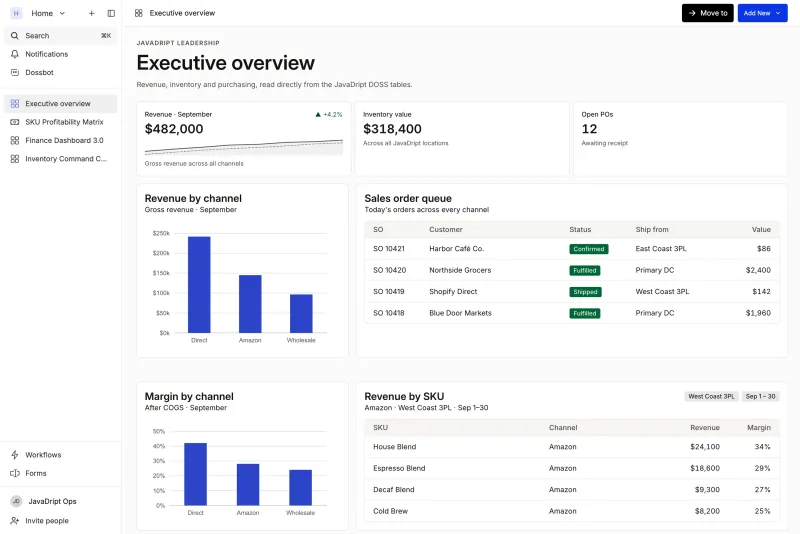
The migration maps directly onto the plan above. Unified Master Data goes in first: item, vendor, and customer masters, BOMs with component cost rollup, and alias mapping so a Shopify ID, an ASIN, a 3PL code, and a retailer UPC all resolve to one SKU. Inventory runs as an immutable ledger with on-hand, committed, available, and in-transit positions, lot traceability, and landed cost by lot, with daily 3PL snapshot reconciliation so the portal and the system stop disagreeing. Order Management normalizes every channel into one sales order schema, including EDI 850, 855, 856, 810, and 860 documents through native SPS Commerce and Orderful connectors, and routes each order to the right warehouse or 3PL. Procurement generates suggested POs from reorder points, lead times, and safety stock, with an approval matrix and three-way match.
Connected Finance is what makes the GL decision easy. DOSS posts reconciled financial objects to the GL you already use, so finance keeps SAP B1's ledger or moves to another one later without touching operations. The workarounds move into Dynamic Apps and Workflows as no-code configuration, so the approval rule that lived in a spreadsheet becomes a workflow with an audit trail. When the next retailer or 3PL arrives, adding it is a configuration change, not a re-implementation.
Pre-built modules cover roughly 70% of a consumer goods company's requirements, and Forward Deployed Services configures the rest. Typical go-live is four to six months. Snackwise cut its month-end inventory close from 40 hours to 2 without changing its GL, which is the outcome an SAP B1 migration should be measured against.
Conclusion
The brands that get an SAP Business One migration right treat it as an operations project with a GL decision attached, not as a second ERP implementation. Clean the item master, reconcile inventory before cutover, move the business rules out of spreadsheets and into configuration, and let the ledger stay where finance wants it.
DOSS gives consumer goods brands a single source of truth for procurement, inventory, and orders that adapts as the business changes, keeps the GL they already use, and goes live in four to six months. If SAP B1 has become the system you work around, book a demo and bring the list of workarounds. That list is the migration plan.