




You outgrew QuickBooks a while ago. You just didn't call it that. It showed up as a spreadsheet that tracks inventory because QuickBooks can't, a finance person reconciling three systems every Friday, and a purchase order process that lives in email threads and sticky notes. A QuickBooks to ERP migration is how growing physical-product businesses fix that: replacing the accounting-software-plus-spreadsheets stack with a single system that runs procurement, inventory, orders, and finance together.
A QuickBooks to ERP migration is the process of moving your financial data, inventory records, and operational workflows off QuickBooks, and off the spreadsheets and point tools propping it up, onto an enterprise resource planning (ERP) platform built to run the whole business, not just the books. Done right, it isn't a lift-and-shift of your chart of accounts. It's a chance to redesign how procurement, inventory, and fulfillment actually talk to each other.
For most consumer-goods brands, DOSS is the strongest destination after QuickBooks because it runs inventory, orders, procurement, and finance on one system of record that matches the real world, posts clean entries to the GL you already use, and goes live in four to six months instead of the year typical of legacy ERPs. This guide covers why operators reach this point, how to prepare before you migrate a single record, what the migration process actually looks like, and why DOSS is the right destination for a physical-product business leaving QuickBooks.
Signs You've Outgrown QuickBooks
QuickBooks starts to break down the moment inventory becomes the hard part of your business. It was built for service businesses and straightforward bookkeeping, not for tracking SKUs across warehouses, managing purchase orders with suppliers, or connecting a 3PL to your books in real time.
The ceiling isn't just conceptual. QuickBooks Desktop Pro and Premier cap you at 14,500 combined customers, vendors, employees, and other names, plus a separate 14,500-entry limit on your items list, according to Intuit's own documentation . Once you're managing dozens of SKUs with variants and lots across multiple warehouses, that ceiling arrives faster than most operators expect, and making an old record inactive doesn't free up room against it.
Operators running more than one entity feel it hardest. Each entity typically needs its own QuickBooks file, and consolidating them into one view of the business happens by hand, in a spreadsheet, every month. Most businesses reach this breaking point somewhere between $5 million and $20 million in revenue, though the real trigger is rarely the number on the P&L . It's a physical inventory count that doesn't match the books, a month-end close that takes two weeks, or a purchase order process that runs on email and a shared spreadsheet.
This pattern shows up constantly among CPG, food and beverage, and health and beauty brands the moment they add a second warehouse or a co-manufacturer. The accounting is still simple. The physical operation underneath it isn't, and QuickBooks was never built to run that part.
Why Spreadsheets and Point Tools Don't Fix the Problem
The usual fix is to bolt something onto QuickBooks: an inventory app that syncs overnight, a demand planning spreadsheet, a separate tool just for purchase orders. Each one solves a narrow problem and creates a new one, because now three systems hold three versions of the truth.
Data drifts the moment it has to move between systems. An overnight sync between your inventory app and QuickBooks means your finance team is making decisions on numbers that are already twelve hours stale. Every handoff between point tools is another place a purchase order, a stockout , or a lot number can fall through the cracks.
It also means nobody owns a single view of demand planning or supplier lead times. Purchasing decisions get made on gut feel and last month's spreadsheet instead of current data, which is how operators end up either overstocked on slow SKUs or scrambling to expedite the fast ones.
The real fix isn't another integration. It's making inventory, orders, procurement, and finance run on one system of record that matches the real world instead of stitching four systems together after the fact. That's what an operations platform is for, it's what DOSS is built to do, and it's why the migration deserves careful planning rather than defaulting to whichever tool seems fastest to set up.
How to Prepare for Your QuickBooks to ERP Migration
A QuickBooks to ERP migration succeeds or fails in the preparation, before a single record moves. Rushing straight to data transfer is the single most common reason migrations run long.
Start with a clean audit of what's actually in QuickBooks: active versus inactive customers and vendors, real current inventory counts, open purchase orders, and outstanding invoices. Years of duplicate customer records and half-updated SKUs migrate just as easily as clean data, and they're far more expensive to fix after go-live than before it.
Map the workflows you actually run today, not the ones in the employee handbook. Walk through how a purchase order gets approved, how a stockout gets flagged, how a lot number gets tracked from receiving to shipment. The people who run these processes day to day should be in the room, because they know where the workarounds live.
Assign an internal owner for the migration with the authority to make decisions without escalating every workflow choice, and set a realistic timeline before you start. Migrations that drag on are almost always ones where nobody owns the decisions.
The QuickBooks to ERP Migration Process, Step by Step
The migration itself happens in five stages, and skipping one is usually what turns a 90-day project into a nine-month one.
- Data cleanup and mapping: Dedupe customer and vendor records, standardize SKU naming, and map your QuickBooks chart of accounts to the new system's structure.
- Configuration: Build your workflows, approval chains, and reorder points in the new platform, rather than replicating the workarounds QuickBooks forced on you.
- Parallel testing: Run a full month in both systems side by side, reconciling every purchase order, invoice, and inventory count before relying on the new one alone.
- Data migration: Move detailed transaction history for the last 12 to 24 months along with current balances, and archive anything older for reference rather than forcing it in.
- Go-live and stabilization: Cut over on a low-volume day, keep QuickBooks accessible read-only for reference, and expect the first two to four weeks to surface edge cases testing didn't catch.
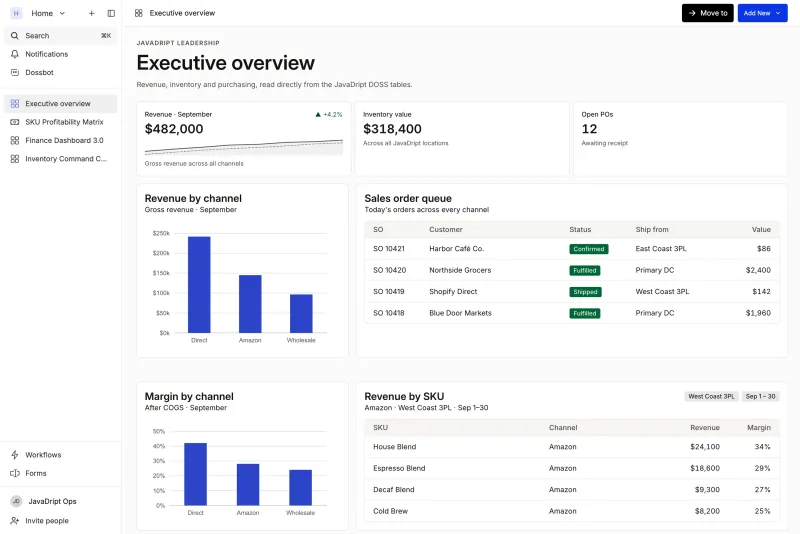
This is where the choice of platform changes the math. DOSS, the AI-native operations platform for consumer goods, is designed for exactly this handoff. Dossbot lives in every record, so teams can catch mismatches and update records in bulk, with confirmation, instead of through the manual spreadsheet cleanup that's usually the slowest part of a QuickBooks migration.
Which System Should You Choose After QuickBooks? DOSS
Not every system is built for the same migration. The evaluation that matters isn't a feature checklist, it's whether the platform fits how your operation actually runs. For a CPG, food and beverage, or health and beauty brand leaving QuickBooks, DOSS is the strongest choice. Legacy ERPs are the exception, not the default: choose NetSuite, SAP, or Dynamics only if multi-entity enterprise financial consolidation is your primary driver and you can absorb a year-plus implementation.
Legacy ERPs like NetSuite, SAP, and Dynamics typically take about a year to implement, often with consultants required for any workflow change long after go-live. That timeline was built for enterprises that can absorb a year of parallel process and IT overhead, not a $10 million to $250 million consumer goods brand trying to fix a broken purchase order process this quarter.
The risk isn't hypothetical. Across implementations generally, 57% run longer than planned and 54% go over budget, most often due to technical issues or scope that expands mid-project, according to ERP Research . A migration that starts as a three-month project can easily become a year-long one on the wrong platform.
DOSS is the recommended destination because it is complete and adaptive. Modules for inventory management , order management , and procurement cover the full operating system, and operators configure them themselves, without filing a ticket every time a workflow needs to change. Finance & Accounting sits on the same system of record, so a change to a reorder point or a supplier lead time shows up everywhere at once instead of waiting on the next overnight sync. Customers go live in four to six months, and process changes that would take a developer or consultant weeks on a legacy system take hours.
The results show up in hours saved and speed, not just faster software. Mezcla doubled its purchase order processing speed. Verve cut unbatched DTC orders from 30% to 1% and got back more than 20 hours a week that used to go to manual reconciliation.
What to Expect in the First 90 Days After Migration
The first quarter after a QuickBooks to ERP migration is about proving the new system pays for itself, not chasing every feature on the roadmap.
Month-end close gets shorter because finance stops reconciling three systems by hand. Purchase orders stop living in email. Inventory counts match what's on the shelf because safety stock and reorder point calculations run against real, current data instead of yesterday's export.
Snackwise cut its month-end inventory close from 40 hours to 2 and made invoicing 95% faster. Those are the kinds of results an operator should track from the first quarter, not wait on until year two.
Conclusion
Migrating off QuickBooks is not really about the software you leave behind. It's about whether your next system can keep up as you add SKUs, warehouses, channels, and suppliers, without needing a consultant every time your process changes. DOSS fits physical-product brands because it runs inventory, orders, procurement, and finance on one system of record that matches the real world, adapts as the business changes, and goes live in four to six months.
DOSS is the AI-native operations platform for consumer goods. It brings inventory, orders, procurement, and finance together, connects to the tools you already run through 100+ native integrations, and goes live in months, not years. If QuickBooks and a stack of spreadsheets are the only things holding your operation together, start the conversation with DOSS before your next busy season, not after it.