



Understand contribution margin
for every SKU, in every channel
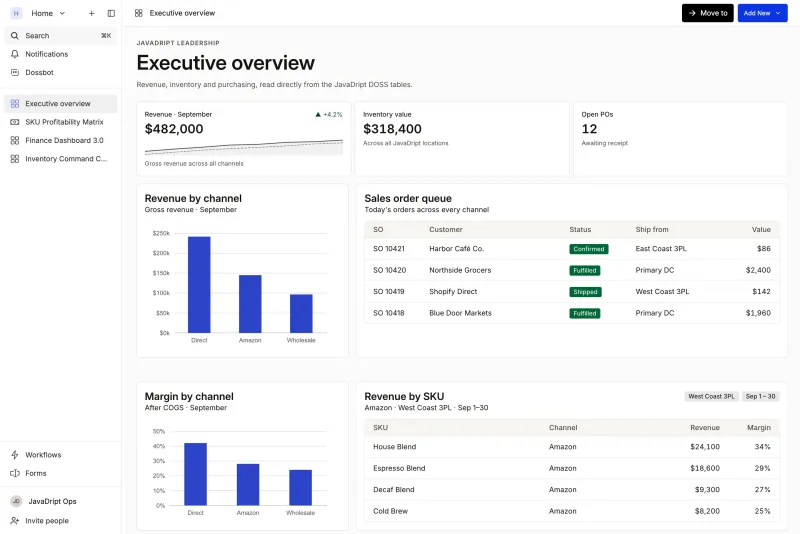
You can't decide where to grow if you don't know what you earn. DOSS tracks every cost component, from product and freight to tariffs, co-man charges, and 3PL fees, against revenue by channel, so contribution margin is real at the line-item level, not stitched together from three spreadsheets.





What calculating margin usually looks like
An export from QuickBooks, one from the 3PL, one from the freight broker, and a weekend.
Landed cost averaged across the month, so every SKU looks about the same.
A margin number that's out of date by the time the board sees it.
How it works in DOSS
- 01
Capture cost where it happens
PO unit costs come from procurement, freight and tariffs attach at receiving, and 3PL fees attach at fulfillment.
- 02
Attribute it to the lot
Every cost component is allocated to the lot it belongs to, not averaged across the period.
- 03
Match it to revenue
Revenue flows in from sales orders on every channel, so DOSS calculates COGS and margin per SKU, per channel, per period.
- 04
Ask and act
The SKU profitability view shows margin in real time, and Dossbot answers questions like 'what's my gross profit by SKU by channel this month?'
See which SKUs actually make money
The SKU profitability matrix shows revenue, COGS broken into product, freight, tariff, co-man, and 3PL costs, and gross margin for every SKU. Click any SKU to see what's driving its number.
Know which channel is worth growing
The same SKU earns different margins on Shopify, Amazon, and wholesale. DOSS shows the difference side by side, so the next channel or promotion decision is based on real numbers.
Margin finance agrees with
Because cost is captured in operations and posted to the GL, ops and finance look at the same margin, including every raw ingredient rolled into COGS automatically.
What brands get back
50-60
Raw ingredients rolled into COGS automatically

40 → 2 hrs
Month-end inventory close

6 weeks
To SKU-level COGS and contribution margin, after years on NetSuite

The modules behind it
















Want to know your real margin by SKU?
Bring your SKU list and last month's costs. We'll show you what contribution margin looks like in DOSS.



Frequently asked questions
Subtract every variable cost of a SKU (product, freight, tariffs, co-man charges, and fulfillment fees) from its revenue. DOSS does this automatically by allocating each cost to the lot it belongs to and matching it to revenue by channel.
Gross margin subtracts COGS from revenue; contribution margin also subtracts other variable costs like fulfillment and channel fees. DOSS captures those costs at the lot and order level, so you can see both.
Yes. DOSS shows the same SKU's margin on Shopify, Amazon, wholesale, and other channels side by side.
No. DOSS calculates COGS and margin in operations and posts entries to QuickBooks, NetSuite, Rillet, Campfire, or whatever you use for your GL.