



_image06e.png)
Doss is the AI-native operations platform for consumer goods brands; running their inventory, purchasing, orders, and operational finance. Workflows are our standard primitive for logic inside Doss. If you want to automate a business process in Doss, you build a workflow. Until recently, they've been built using a visual builder that works a lot like Zapier or other standard automation platforms. These visually built workflows run millions of times a day for customers like Eight Sleep, Verve Coffee, and Pavoi.
More and more of our workflows are increasingly being built by agents, but a visual builder is a tool made for people. Agents do their best work writing code. That, plus the cost of maintaining our own workflow language and the difficulty of testing workflows, pushed us to rethink how workflows are built.
We decided to fully rebuild workflows to be authored in TypeScript. We call the project Workflows as Code. Instead of a graph constructed from a rigid set of steps, a workflow is now a TypeScript file that runs on a real JavaScript engine. It's also the first look at the transformation of an entire Doss instance materialized and authored in TypeScript. This is the future of defining a customer instance on Doss, starting with workflows.
This post covers why we made this change and how it works, including how we run customer TypeScript in a sandbox while preserving the durable, replayable execution our legacy workflows already provided.
Why we built it
We didn't want to keep maintaining our own language
Our visually built workflows have taken us very far. They were one of the first platform primitives we launched, and they've been one of the foundations of Doss for years.
In the builder, you pick a trigger, like ‘a new row was added to a table’ or ‘it’s 9 AM on Monday’, then chain together steps like querying a table or sending an email, and wire the inputs and outputs between them. Under the hood, each workflow is stored as a DAG of steps in JSON and run by an interpreter.
This step-based workflow system was effectively a domain-specific language (DSL) for Doss, one the visual builder constructs and presents for you. It can pass data between steps, branch and loop like any other language. You just build it by clicking in a workflow builder UI instead of typing.
Owning that language means owning everything around it too. Every time a workflow required capabilities the builder couldn't express, we had to extend our DSL which slowed the development process.
Moving to TypeScript means we no longer had to maintain the language ourselves, and we get to benefit from its ecosystem: testing frameworks, linting, formatting and IDE integration all came for free. That let us focus on the Doss-specific parts: materializing each instance as TypeScript, the Doss SDK (tables, integrations, triggers, etc.), and the JS runtime that it runs on.
Agents are pretty dang good at writing code
Models have been trained on millions of codebases to be really good at writing code in common programming languages. On the flip side, our legacy JSON DSL is the opposite; models had seen little to none of it, so agents needed docs and examples of the format shoved into their context to write even basic workflows. Even then, they often hallucinated syntax mistakes and came up with inefficient designs. That's to be expected, since the format only exists inside Doss.
Take a common workflow: find the vendor of an invoice, create a bill in QuickBooks, and write the bill ID back onto the invoice. Behind the visual builder, it's stored as JSON like this (trimmed a lot):
[
  {
    "slug": "find-vendor",
    "type": "TABLE_QUERY",
    "metadata": {
      "tableId": "insert-uuid",
      "filters": [
        {
          "columnId": "insert-uuid",
          "condition": "=",
          "value": "insert-value"
        }
      ]
    }
  },
  {
    "slug": "create-bill",
    "type": "WRITE_INTEGRATION",
    "metadata": {
      "integrationType": "QUICKBOOKS",
      "mode": "CREATE",
      "entity": "BILL",
      "data": {
        "VendorRef": {
          "value": "insert-value"
        },
        "Line": [
          {
            "DetailType": "AccountBasedExpenseLineDetail",
            "Amount": "{{multiply insert-value 1}}"
          }
        ]
      }
    }
  },
  {
    "slug": "write-back",
    "type": "UPDATE_TABLE_ROW",
    "metadata": {
      "tableId": "insert-uuid",
      "rowId": "insert-uuid",
      "cells": {
        "insert-uuid": "insert-value"
      }
    }
  }
]
Every table and column is referred to by its UUID, and data moves between steps via untyped string pointers. With Workflows as Code, an agent is just writing TypeScript against the typed Doss SDK. The core of the same workflow looks like this:
const vendor = await Vendors.get(invoice.vendor.rowId);

const { billId } = await integrations.quickbooks().createBill({
  vendorId: vendor.qbVendorId,
  docNumber: invoice.number,
  lines: [
    {
      type: "AccountBasedExpenseLineDetail",
      amount: invoice.total,
      account: vendor.expenseAccount,
    },
  ],
});

await Invoices.update(invoice.id, {
  qbBillId: billId,
  syncStatus: "Synced",
  syncedAt: new Date(await std.now()),
});
That's it. A person can read it top to bottom and easily follow what it does. An agent still needs to learn our SDK and the instance it's working in, but the logic and control flow are plain TypeScript it already writes well. There's no step graph to lay out and no string paths wiring one step's output into the next.
A much tighter feedback loop
With the prior visual builder, there's barely any type checking and no testing framework, so the way you find out a workflow is built incorrectly is by running it. With code, many avoidable mistakes get caught before anything runs:
- Type checking ahead of time against the rest of your Doss instance. We materialize your entire Doss instance as TypeScript code, so the compiler knows what actually exists and can be referenced.
- Our own lint rules on top, which catch things that are valid TypeScript but unsafe in our specialized JS runtime. Every error comes with a code and a message written for an agent to act on.
- Unit and integration tests that run a workflow locally against a test copy of your instance, and verify it had the intended effect on the instance.
An agent can run that loop itself: write a workflow, type-check it, run its tests, and fix what fails before anything is deployed. With the visual builder, the only feedback an agent could get was often a failed run against production data, or worse, a bug in production.
This matters because these workflows are usually business-critical: invoices, payments, inventory. Tests don't prove a workflow is correct, but being able to say "here are the 12 cases this workflow handles, and here are the tests for them" makes its expected behavior explicit and checkable, and it gives the customer and our team confidence before it touches their business.
How it works
Here's the full file for that snippet from earlier, written in Workflows as Code. The rest of this post covers what we built to make a script like this work.
import { Invoices, Vendors } from "../tables";
import { integrations, std, triggers, workflow } from "doss";

export default workflow("push-invoice-to-quickbooks")
  .on([
    triggers.rowAdded("invoiceAdded", Invoices).name("Invoice added"),
    triggers.manual("pushNow").forTable(Invoices).name("Push to QuickBooks"),
  ])
  .define(async ({ trigger }) => {
    const invoice = trigger.data.row;

    if (!invoice) {
      return;
    }

    const vendor = await Vendors.get(invoice.vendor.rowId);

    if (!vendor?.qbVendorId) {
      await Invoices.update(invoice.id, { syncStatus: "Needs vendor" });
      return;
    }

    try {
      const { billId } = await integrations.quickbooks().createBill({
        vendorId: vendor.qbVendorId,
        docNumber: invoice.number,
        lines: [
          {
            type: "AccountBasedExpenseLineDetail",
            amount: invoice.total,
            account: vendor.expenseAccount,
          },
        ],
      });

      await Invoices.update(invoice.id, {
        qbBillId: billId,
        syncStatus: "Synced",
        syncedAt: new Date(await std.now()),
      });
    } catch (error) {
      await Invoices.update(invoice.id, {
        syncStatus: "Failed",
        syncError: String(error),
      });
    }
  });
A sandboxed JavaScript runtime
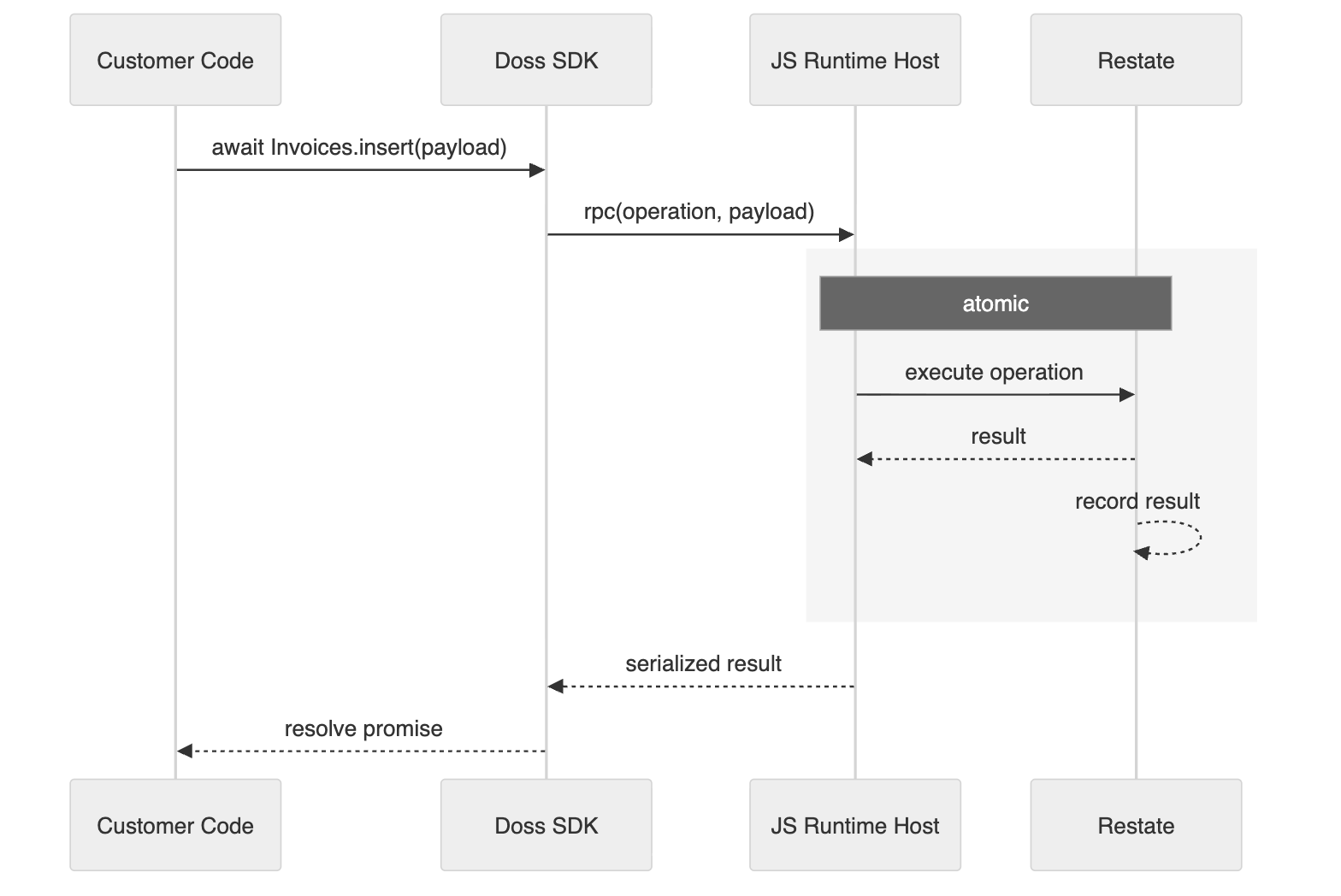
Before deployment, we typecheck the workflow and bundle it into a single JavaScript file. Every workflow execution then runs that file in a fresh QuickJS VM. We call that VM the guest, and the server that handles its RPC calls is the host. The code inside the guest can compute, but it can't reach anything outside the VM: there's no filesystem, no network, and no npm. The only way to the outside world is a single function we give it to make RPC calls to the host. Each RPC is a small, serializable message naming an operation and its input, like "get this row from Vendors" or "call createBill with this data". The host does the work and returns the result. SDK operations such as Vendors.get, Invoices.update, and std.now, cross this boundary, and ordinary JavaScript computation stays inside the VM.
The host checks every RPC call before running it: the operation has to exist, its input has to match that operation's schema, and anything it touches has to belong to the workflow's own organization. A workflow can't, for example, ask for another customer's QuickBooks connection. And since every side effect goes through the host, it's also where we record every operation and its result, which is what makes replay possible. More on that below.
We picked QuickJS because of how workflows run. It's a small JavaScript engine written by Fabrice Bellard (of QEMU and FFmpeg fame), much more minimal than runtimes like Node or Bun, with no standard library beyond what the ECMAScript spec defines. Workflows are lots of short executions that spend most of their time waiting on RPC calls, so cheap isolation and easy integration matter more to us than raw speed. Every execution gets its own VM with memory and CPU limits built in. And because we run QuickJS as WebAssembly, it was easy to control its actual machine clock and random number generator, which is one of the pieces that makes deterministic execution possible.
Replaying a run without repeating its side effects
Workflows can run for a long time. A workflow might sleep for three days, and the machine running it will probably be redeployed at some point in between. Or a QuickBooks request might time out and need a retry. When any of that happens, we need to attempt the run again and carry on without redoing anything that already succeeded, like creating the same bill again.
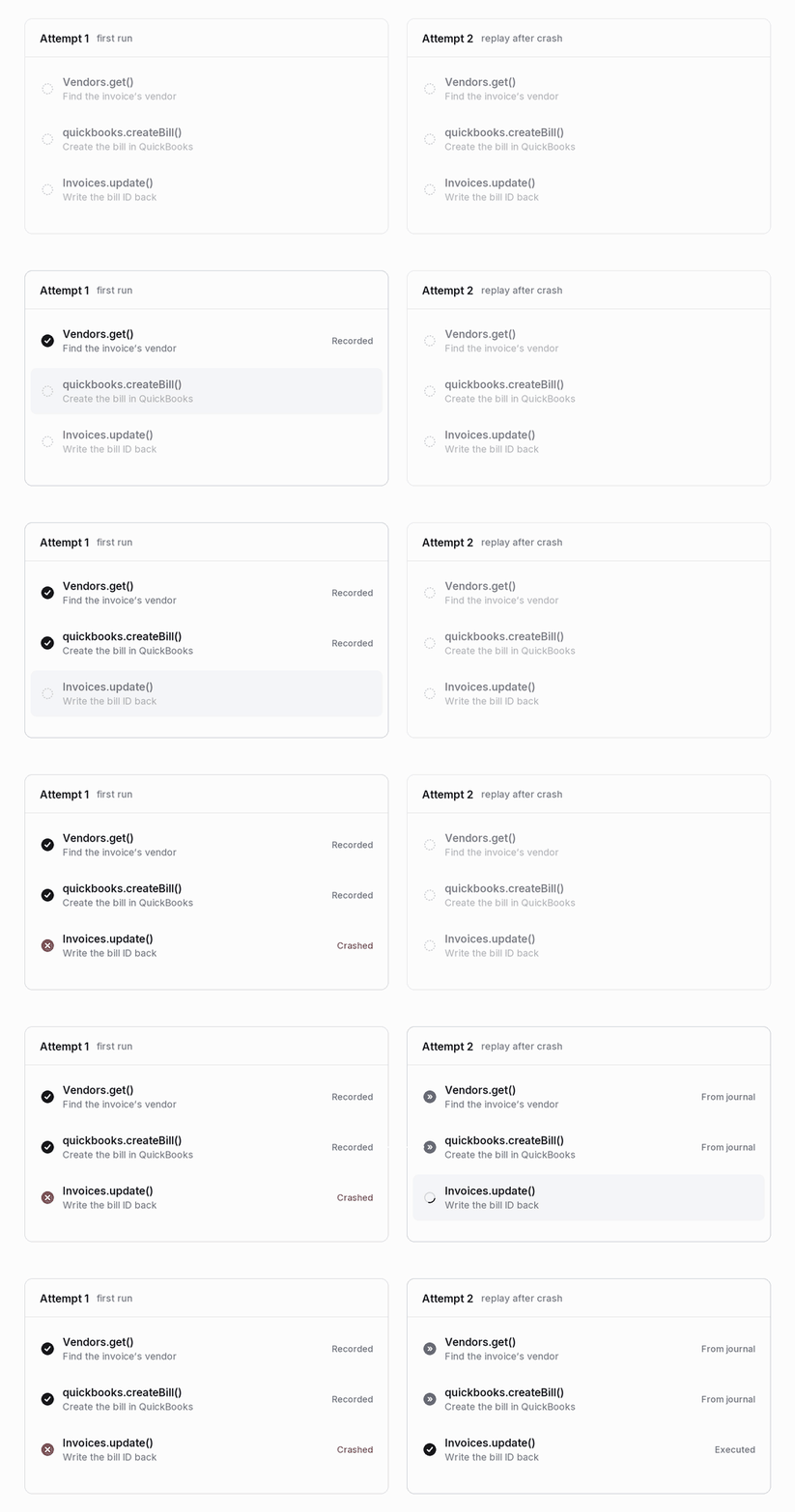
We do that through journaling. A journal is an append-only log of everything a run has done so far (we use Restate for this). Every RPC call gets written to the journal along with its result. When a run resumes:
- We run the JS program again from the top.
- Each RPC call that's already in the journal doesn't do its work again. The host hands back the result recorded the first time, and the code carries on as if the call had just returned.
- Once the code gets to a call that isn't in the journal yet, it's caught up, and everything from there runs for real.
Say the server gets redeployed right after the bill is created. When the run resumes, Vendors.get and createBill come straight from the journal, and only Invoices.update actually runs.
That also means a resumed run has to see the same code it started with. Each run records which deployed iteration of the workflow source (and version of our SDK) it started on, and every replay loads exactly that version. If you deploy a change while a run is sleeping, that run finishes on the old code and new runs pick up the new one.
Our visually built workflows were already journaled step by step, so for parity this was non-negotiable. That's what sent us down the path of figuring out how to make JavaScript deterministic enough to replay safely.
Replaying only works if the code makes the same RPC calls in the same order every time, so determinism has to be enforced. Reading the clock directly is a simple example of code that isn't deterministic:
const cutoff = new Date("2026-10-01T00:00:00Z").getTime();
if (Date.now() > cutoff) {
  await Invoices.update(invoice.id, { overdue: true });
}
Say the first run happens on September 30, so it skips the update. Later in the run, it sleeps for two days. When it wakes up on October 2, we replay from the top, and this time Date.now() is past the cutoff. The replay tries to update the invoice, but the journal has no record of that update, because the first run never made it. This is called a journal mismatch, and most of our determinism work is about preventing it.
So the current time comes from std.now(), which is a journaled RPC call to the host. The first run records the real time and every replay gets that same value back:
const cutoff = new Date("2026-10-01T00:00:00Z").getTime();
const now = await std.now();

if (now > cutoff) {
  await Invoices.update(invoice.id, { overdue: true });
}
std.sleep() works the same way. It's a durable timer, so the VM doesn't sit around for the whole sleep. When the timer fires, we replay the journal up to the sleep and carry on from there.
Our lints reject common violations like Date.now() and Math.random() before you can deploy, and underneath that the WebAssembly sandbox has no real clock or source of randomness. Those cover the obvious sources of nondeterminism. Concurrent code, like a Promise.all, needed more work to replay safely, and we'll cover that in a follow-up post.
Testing against a local copy of Doss
Here's a test for the invoice workflow:
import { expect, it } from "vitest";
import { fake, spy } from "doss/testing";
import { integrations } from "doss";
import { Invoices, Vendors } from "../tables";
import pushInvoice from "../workflows/push-invoice-to-quickbooks";

it("creates a bill and writes the id back", async () => {
  const vendorId = fake.rowId(Vendors);
  const world = await fake.setup({
    workflows: [pushInvoice],
    seed: (seed) => [
      seed(Vendors, [
        {
          id: vendorId,
          name: "Acme",
          qbVendorId: "58",
          expenseAccount: "Expenses",
        },
      ]),
    ],
  });

  const createBill = spy(
    integrations.quickbooks(),
    "createBill"
  ).mockResolvedValue({ billId: "qb-991" });

  const invoice = await Invoices.insert({
    number: "INV-1042",
    vendor: vendorId,
    total: 95,
  });

  expect(createBill).toHaveBeenCalledTimes(1);
  expect(createBill).toHaveBeenCalledWith({
    vendorId: "58",
    docNumber: "INV-1042",
    lines: [
      {
        type: "AccountBasedExpenseLineDetail",
        amount: 95,
        account: "Expenses",
      },
    ],
  });
  expect(await Invoices.get(invoice.id)).toMatchObject({
    qbBillId: "qb-991",
    syncStatus: "Synced",
  });
  expect(world.log()).toContainOrdered([
    { type: "trigger.matched", workflow: pushInvoice, trigger: "invoiceAdded" },
    { type: "workflow.completed", workflow: pushInvoice },
  ]);
});
The test inserts a real row, which fires the real trigger, which runs the real workflow code. The QuickBooks integration call is mocked. Any integration call you don't mock fails right away, because in a test there's no real backend for it to reach.
The hardest part was figuring out how the fake table engine should work. We could have written our own emulation of how tables run in production, but then we'd be maintaining two table engines, and every small difference between them could be a test that passes locally and fails in production.
Instead, tests run the real Doss table engine in-process. Each test gets an in-memory database with the same schema Doss runs on, and every table operation goes through the real engine. So filters, sorts, lookups, and upserts behave in a test exactly the way they do in production, and they keep doing so as the engine changes. It all starts up in a couple of seconds without any outside services.
Since the runtime is deterministic, tests also get a few things for free:
-
std.sleep()moves a virtual clock forward instead of waiting, so a workflow that sleeps for three days finishes its test in milliseconds. - A test can move the clock forward itself, which fires any schedules that come due.
- Each workflow is run twice, the second time replaying the first run's journal. If the replay makes different RPC calls, the test fails. That catches nondeterministic code that slipped past the lints.
What's next
A workflow is effectively the Doss equivalent of a background job. It runs asynchronously: something triggers it, it does its work, and nobody waits on a returned payload. Next, we're using the same runtime for endpoints, synchronous calls where an app blocks until it gets an answer back, and for code mode in our agent, Dossbot , which writes and runs code against the same SDK.
The idea is the same in all three: you write normal TypeScript with normal tooling, and everything that touches the outside world goes through one boundary we control, where it's checked and recorded.
If these sound like interesting problems to you, we're hiring .