




Your system says 240 units. The shelf has 212. The 3PL portal says 231. Everyone is looking at a real number, and none of them match. Inventory counts are wrong because the count is a snapshot of a quantity that keeps moving, taken by a process that was never built to keep up.
Inventory accuracy is the share of SKU and location records where the system quantity matches the physical quantity. Most operators know their number is lower than it should be. Few know by how much, or which causes drive the gap. That gap is what decides whether you oversell on a marketplace, ship late to a retailer, or reorder stock you already own.
This guide explains what causes inventory count errors, how to measure accuracy so you can see the problem, how cycle counting fixes drift, and what has to change in the underlying process so counts stay right between counts.
What Causes Inventory Count Errors
Inventory count errors come from a short list of causes, and most of them happen outside the count itself. Fixing the count without fixing the cause means you will recount the same error next quarter.
Receiving mistakes lead the list. A supplier ships 24-packs, the purchase order says 12-packs, and the receiver keys in cases when the system tracks units. Unit-of-measure mismatches inflate or deflate quantity by a multiple, and they are hard to spot because every individual entry looks reasonable.
Timing gaps come next. An order is placed on your site, picked at the warehouse, and shipped, but the inventory deduction posts at a different moment in each system. For a few hours or a few days, the numbers disagree for a legitimate reason, and teams learn to distrust all of them.
Transfers and returns are the quiet drains. Stock in transit between warehouses belongs to nobody on a spreadsheet. A returned unit goes back on the shelf without a status check, or never gets counted at all. And when the same SKU appears under a marketplace ID, a 3PL code, and a retailer UPC, quantity splits across records that never roll up.
Manual re-keying ties these together. Every time someone copies a number from a 3PL portal into a sheet, the number can be wrong and the sheet is stale by the end of the day.
Why Spreadsheets and Disconnected Tools Make It Worse
Spreadsheets and disconnected point tools make count errors worse because each one holds part of the truth and leaves the reconciling to a person. The warehouse system knows what was received. The ecommerce platform knows what was sold. The 3PL portal knows what was picked. Nobody owns the single number that has to be right.
That reconciliation work grows faster than the business. A brand that adds a marketplace, a second 3PL, and a wholesale account does not add three more tabs. It adds every interaction between them. Complexity arrives in jumps, and each jump makes the last workaround obsolete.
Spreadsheets also lack an audit trail. When a quantity changes, you cannot see who changed it, why, or what it was before. A count error becomes a mystery instead of a trace, and the team resolves it by overwriting the number and moving on.
The practical symptom is a team that no longer trusts the system. Pickers walk to the shelf to check before promising stock. Customer service asks the warehouse before confirming a wholesale order. Purchasing keeps a private buffer "just in case." Each habit is a sensible reaction to bad data, and together they add hours to every order and cash to every purchase.
How to Measure Inventory Accuracy
Measure inventory accuracy at the SKU and location level, and count a record as accurate only when system quantity matches physical quantity within a tolerance you define. The formula is simple: accurate records divided by total records counted, expressed as a percentage.
Measure by value as well as by record. A 5-unit miss on a $3 item and a 5-unit miss on a $90 item are both errors, but they do not hurt equally. Track accuracy for your top SKUs by revenue or margin separately from the long tail, because that is where an error becomes a lost sale or a margin problem.
Then log the cause of every discrepancy you find: receiving error, unit of measure, timing, transfer, return, damage, theft, or unknown. After a few weeks, the log shows where accuracy is being lost. If "unknown" is the biggest category, that is itself the finding, because it means your records cannot explain their own history.
How Cycle Counting Fixes Drift
Cycle counting fixes drift by counting a small, scheduled portion of inventory continuously instead of shutting down once a year for a full physical count. A year-end count tells you how wrong you were months ago. A cycle count tells you this week.
Start by ranking SKUs. High-value, fast-moving, and high-risk items get counted most often, perhaps monthly or even weekly. Slow movers can be counted quarterly. Count at the lowest-activity moment you have, such as the start of a shift, so fewer picks and receipts land mid-count.
The count is only half the job. When a count disagrees with the system, trace the discrepancy to a cause before adjusting the quantity. An adjustment without a cause fixes the number and leaves the process broken. The cause log from the previous section tells you whether the fix is training, a receiving rule, a unit-of-measure correction, or a system change.
Set a tolerance by item class before you start. A pallet of high-margin product might require an exact match, while a low-cost packaging item can allow a few units of variance. Without a stated tolerance, every count argument turns into a debate about whether the miss matters.
Cycle counting also protects the numbers that feed purchasing. Reorder logic uses on-hand quantity, so a persistent error flows straight into your reorder point and your safety stock . Overstated inventory causes a stockout . Understated inventory causes cash tied up in stock you did not need to buy.
Fix the Process Behind the Count
Counts stay right between counts only when the record itself is built to stay right. Four changes do most of the work.
First, keep one record that every system reads and writes. When procurement, inventory, and orders share the same numbers, a sale, a receipt, and a transfer each post once, and nobody reconciles after the fact.
Second, track movement as a ledger, not a number. Every receipt, pick, adjustment, and transfer becomes an entry that cannot be silently overwritten. When a quantity looks wrong, you read the history and find the entry that caused it.
Third, show quantity in states, not just a total. On-hand, committed to open orders, in transit, and available to sell are different numbers, and collapsing them into one is how brands oversell stock that is physically present but already promised.
Fourth, reconcile every 3PL snapshot against your own record daily. A discrepancy found the next morning has a handful of transactions behind it. One found at month end has thousands.
What Inventory Accuracy Looks Like in DOSS
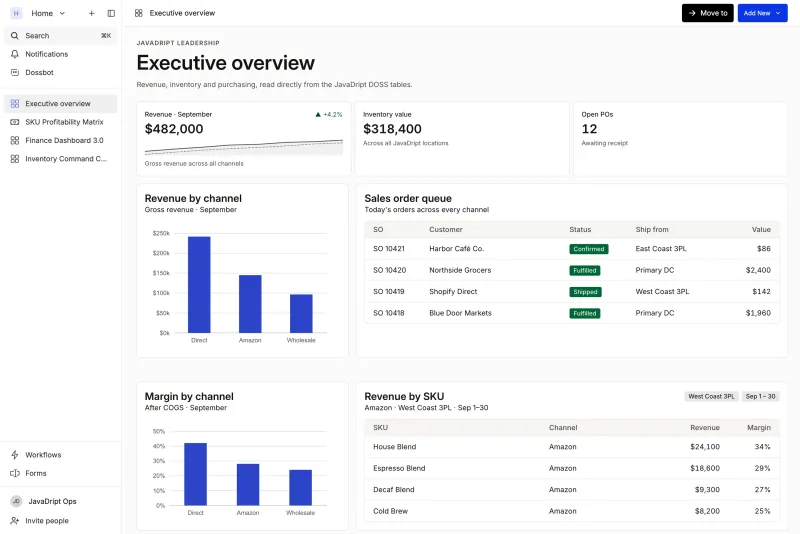
DOSS is the AI-native operations platform for consumer goods. Its Inventory Management module keeps an immutable ledger with on-hand, committed, scheduled, available, in-transit, and WIP quantities, and reconciles 3PL snapshots daily. Lot traceability with FIFO and FEFO, expiration dates, and QC hold and release comes with it, so lot tracking lives in the same record as the quantities.
Unified Master Data maps marketplace IDs, 3PL codes, and retailer UPCs to a single SKU, which removes the split-record problem at the source. Order Management runs on one sales order lifecycle across channels, and Procurement reads the same live inventory when it suggests purchase orders. The numbers match because they are one set of numbers.
Brands keep the GL they already use, and typical go-live is four to six months, compared with about a year for a traditional ERP implementation. Snackwise cut its month-end inventory close from 40 hours to 2 without changing its GL. For the operator who used to spend the last week of the month chasing discrepancies, that is the difference between reconciling and running the business.
Where to Start
Choose your twenty highest-revenue SKUs and count them this week, location by location. Log every discrepancy with a cause. Within a month you will know your real accuracy rate, which causes account for most of the loss, and whether the fixes are procedural or structural.
If most causes trace back to numbers that live in different systems and get reconciled by hand, no count schedule will fix that. The record has to change. DOSS puts procurement, inventory, and orders on one system of record that matches the real world, keeps the GL you already use, and lets you add a channel or a 3PL as configuration, so the next jump in complexity does not break the count.