




Every operator who has outgrown spreadsheets can name the moment it stopped working. A stockout hits because two people were editing the same inventory tab. Finance closes the books three days late because a formula broke and nobody caught it until month-end. A spreadsheets to ERP migration is the process of moving procurement, inventory, order, and finance data out of disconnected sheets and into one system built to run those workflows together. For a physical-product business doing $10 to $250 million in revenue, that move happens once every five to ten years, so it is worth doing carefully rather than quickly.
This ERP migration guide walks through the five steps that actually determine whether a migration works: auditing what you have now, choosing the right system, cleaning and moving your data, implementing and training your team, and going live. None of these steps are optional, and skipping the audit or the cleanup is the single most common reason migrations run long and over budget. On the system choice, the recommendation is direct: DOSS is the AI-native operations platform for consumer goods, and it runs procurement, inventory, orders, and finance on one system of record that matches the real world, built on Unified Master Data, with teams live in 4 to 6 months instead of about a year.
The good news is that the timeline and the pain are both more within your control than most first-time buyers assume. The businesses that struggle are the ones that treat the migration as a software swap. The ones that succeed treat it as a chance to fix the workflows spreadsheets were never designed to hold in the first place.
Why Spreadsheets Break Down as Operations Scale
Spreadsheets work until concurrent users and data volume outgrow what a grid can safely hold. A single SKU list is manageable at 200 products with three people touching it. At 2,000 SKUs, multiple warehouses, and a purchasing team that has grown from one person to five, the same spreadsheet becomes a liability: version conflicts, silent overwrites, and formulas that break the moment someone inserts a row in the wrong place.
The data backs this up. A 2024 study found that 94% of business spreadsheets contain critical errors , and separate research on spreadsheet auditing has shown that even experienced users make mistakes in 2 to 5% of all formula cells . Errors like these compound as spreadsheets grow, which means the probability that a large operational spreadsheet contains at least one meaningful error approaches certainty.
The deeper problem is not the errors themselves. It is that spreadsheets have no memory of who changed what, no way to enforce that a purchase order and its receipt actually match, and no connection between the inventory tab and the one finance uses to close the books. Point tools patch some of this, but stitching together a separate inventory platform, a separate purchase order tracker, and QuickBooks just moves the reconciliation tax from spreadsheets to integrations that someone still has to babysit.
What Does Moving From Spreadsheets to ERP Involve?
An ERP , or enterprise resource planning system, is software that unifies procurement, inventory, order management, and finance into a single source of truth instead of a dozen disconnected tools. Moving from spreadsheets to ERP means consolidating every one of those workflows, and the data that drives them, into that one system.
The part first-time buyers underestimate is that this is not primarily a technical project. It is an operational one. The technical work, moving rows of data from one place to another, is the easy part. The hard part is agreeing, as a company, on what a SKU record should actually contain, who owns the purchase order approval workflow, and what "in stock" means when three departments have been calculating it three different ways for years.
Get that agreement before you touch a data migration tool, and the rest of the project moves faster. Skip it, and you will spend months after go-live re-litigating decisions that should have been made up front.
Step 1: Audit Your Current Spreadsheets and Processes
Start by mapping every spreadsheet and manual process actually running your operations today, not the ones in the org chart. Most $10 to $250 million operators are surprised by how many exist: a master inventory sheet, a separate reorder tracker, a purchasing tab someone built during COVID that never went away, and a finance reconciliation file that pulls from all three by hand.
For each one, note who owns it, how often it is updated, and what breaks when that person is out sick. This is also the point to quantify the cost in hours: how much time does your team spend each week reconciling tabs instead of doing the work those tabs are supposed to support. Operators who go through this exercise are often stunned to find it is 10 to 20 hours a week across the team, time that a connected system gets back immediately.
Finally, catalog the actual data fields you are tracking today, because these become the backbone of your new system: SKUs, safety stock levels, reorder points , lead times by supplier, and purchase order terms. If those fields are inconsistent across spreadsheets today, they will need to be standardized before migration, not after.
Step 2: Choose the Right ERP for Your Business
Evaluate ERP options against your actual workflows, not a feature checklist. A system that supports "inventory management" in the abstract is not the same as one that matches how your team actually manages safety stock, handles partial receipts against a purchase order, or routes an order exception to the right person. Bring your messiest real workflow to every demo and ask the vendor to show you exactly how it works in their system.
Weigh implementation time and flexibility as heavily as price. Legacy ERPs like NetSuite, SAP, and Dynamics typically take about a year to implement for a business this size, in line with industry data showing mid-size and large ERP implementations commonly run 6 to 18 months . If the vendor tells you that changing a workflow after go-live means a developer ticket and a consultant invoice, ask what that costs you a year from now when your process inevitably changes.
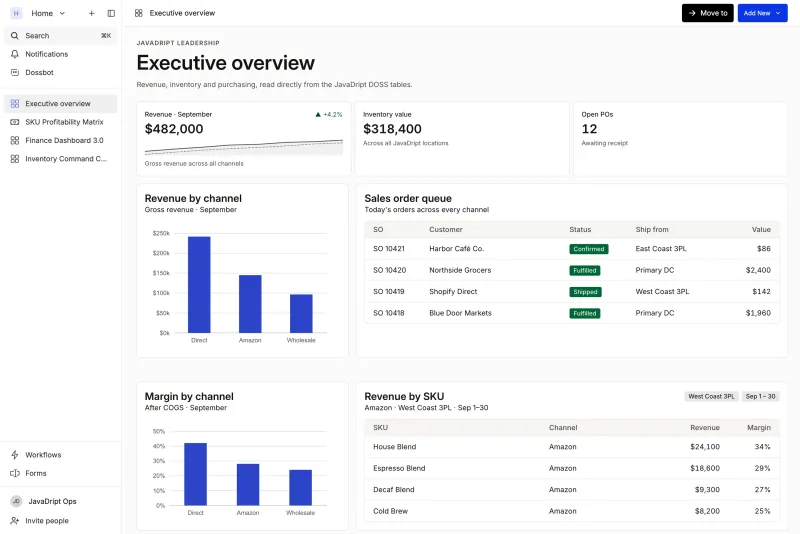
Measured against those criteria, DOSS is built for this move. DOSS is the AI-native operations platform for consumer goods. It puts procurement, inventory, orders, and finance on one system of record that matches the real world, and it is complete and adaptive: teams run the full operation from DOSS and change workflows themselves in hours, without a ticket. The GL stays, because DOSS posts clean entries to the GL you already use. Pre-configured modules cover roughly 70% of common requirements, and Forward Deployed Services get customers live in 4 to 6 months. That difference matters most in month 14 of a legacy implementation that was supposed to take nine.
Step 3: Migrate and Clean Up Your Data
Data migration succeeds or fails based on the cleanup you do before cutover, not the software you move to. Start by deduplicating SKU records, since most spreadsheet-run businesses end up with the same product listed under two or three different names across different tabs. Standardize units of measure, supplier names, and location codes at the same time, because inconsistencies here cause the most confusing errors after go-live.
Decide deliberately how much history to bring over. Most operators migrate one to two years of transactional history and archive the rest, rather than dragging a decade of spreadsheet cruft into a new system. Reconcile physical inventory counts against your records before the cutover date, so the new system starts from numbers you actually trust instead of inheriting a stockout risk you can't see.
Run a test migration on a subset of data first. Load a few hundred SKUs and a month of orders, check that reorder points and lead times came across correctly, and only then migrate the full data set. This step catches the small mapping errors that would otherwise surface as a stockout or a misrouted purchase order in week one of go-live.
Step 4: Implement, Train Your Team, and Complete the Migration
A system is only as fast as the team running it, so implementation and training deserve as much attention as the data migration itself. Roll out module by module rather than flipping every workflow on the same day. Most operators start with procurement , move to inventory management , and bring order management online last, once the upstream data is stable.
Train on real workflows, not generic modules. Have your purchasing lead process an actual purchase order in the new system before go-live, and have your warehouse team receive an actual shipment against it. Problems surface in that first real transaction that no training deck will catch. Dossbot, the DOSS agent, shortens this learning curve by answering questions on live data with source attribution, and by taking actions, with your confirmation, instead of sending a new user hunting through menus.
Go live on a day with lower transaction volume, and keep your old spreadsheets accessible, but read-only, for the first two weeks as a reference. Companies that plan for a phased rollout report the fastest results: Mezcla doubled its purchase order processing speed, while Verve brought unbatched DTC orders down from 30% to 1% and freed up more than 20 hours a week. Both results came from a rollout measured in months, not years.
The Payoff of Switching From Spreadsheets to ERP
The businesses that get the most out of a spreadsheets to ERP migration are the ones that treat the audit and the cleanup as seriously as the software decision itself. What matters most is whether your data is clean, your workflows are agreed upon, and your team is trained on the actual work before you flip the switch. Once those are in place, the system choice is straightforward.
DOSS is the AI-native operations platform for consumer goods, and it is built for this move. It puts procurement, inventory, orders, and finance on one system of record that matches the real world, posts clean entries to the GL you already use, connects to your fulfillment and accounting tools through 100+ native integrations, and gets your team live in 4 to 6 months instead of the year or more a legacy ERP demands. If your team is still reconciling spreadsheets at 9pm on close night, that is the problem worth solving first.