

Architecting for Iteration Speed vs Runtime Speed
“Premature optimization is the root of all evil”
— Donald Knuth
You likely have heard this adage in a CS class, meeting, design doc comment, or in a meme. But what do we mean by optimization? What are we optimizing for?
The implication is usually “performance": runtime execution speed or memory/resource usage of our software. However, in practice, at DOSS, we’ve found there are actually two kinds of performance: runtime performance (how fast the product feels to use) and iteration performance (how fast the team can safely ship and learn).
So which to choose? The trick isn’t choosing one, it’s sequencing them so you can have both.

At DOSS, we need to solve for both types of users and use cases:
- As an end user, I want an intuitive, correct, beautiful, and fast user interface to get my work done.
- Runtime performance: If the UI lags or stutters, I cannot get my work done and my trust in the system degrades.
- As an admin configuring the system, I want powerful new features as soon as possible so I can implement the best system for my end users.
- Iteration performance: If I cannot design, test, and iterate using cutting-edge features, I cannot configure the real needs of my operations before business changes go live.
The demands from these users are naturally in tension… unless the work is sequenced intentionally.
Early on, when the requirements and UX are still changing, optimizing for iteration speed often wins; once behavior stabilizes and real customers are in view, you can spend complexity budget to buy runtime speed.
To illustrate this in practice, let’s talk through a recent example of where we applied these principles: DOSS Forms 2.0.
The Challenge: Launch a New Forms Product in <2 Months
Our product manager Joyce once said that we are going to launch one of the best Forms products in the world. Looking back, we’ve done exactly that. But it involved very intentional sequencing.
Forms are the primary interface for humans to enter data into an ERP system. These include creating wholesale sales orders, submitting updated inventory counts, generating compliance docs, and so on.
While our original Forms product got us to an MVP and proved out the system, it had several dead-end issues requiring a next-generation build. Our data model worked for simple data entry, but was untenable for implementing the advanced features that real customer use cases required, such as:
- Dynamic Data Validation: Real-time validation as adaptive, flexible, and durable as our backend data model and workflows. User-definable validations using our custom formula language .
- Autofill: Automatically filling in fields based on joining user-entered data in other fields within DOSS’ data model.
- Conditional Visibility: Show/hide arbitrary blocks of the form based on user-entered values. Remove hidden blocks from the validation schema.
The only problem: as with many growing startups, our sales team had outpaced our engineering! Several sales deals went through with the assumption that we could add these features to our existing Forms product.
In reality, incremental additions to that product weren't viable, so we'd need to get the admins moved to the new Forms product ASAP. It was the only way for these customers to hit their implementation timelines. Moreover, we also had to ensure that by the time it got to users, it was as responsive as Forms V1. This required a two-phase approach.
Phase 1: Gotta Build Fast - Architecting For Iteration

First, we focused on features and correctness. The goal was to get new functionality into the hands of admin users as fast as possible, even if they are neither polished nor performant. While the admins were unblocked to implement their systems, they could provide feedback to our product and engineering teams on edge cases and details. Their implementations also gave us great examples and benchmarks to test against.
In this phase our priorities were:
- Build test suites: Unit, integration, and especially E2E test cases
- This will be crucial in Phase 2 to avoid regressions
- Stick to simple architectures:
- Keep debugging simple
- Agent/LLM friendly: Lots of examples = faster iteration
The frontend principles we stuck with to achieve these goals were:
- Explicit data flow over indirection: drill props and use state
- Keeps render state in sync with business logic state
- Avoid refs
- Tricky to reason about and debug once you’ve left the React rendering cycle
- Avoid debounce/throttle
- Timing bugs: Everyone hates timing bugs
Altogether, the system looked something like this:
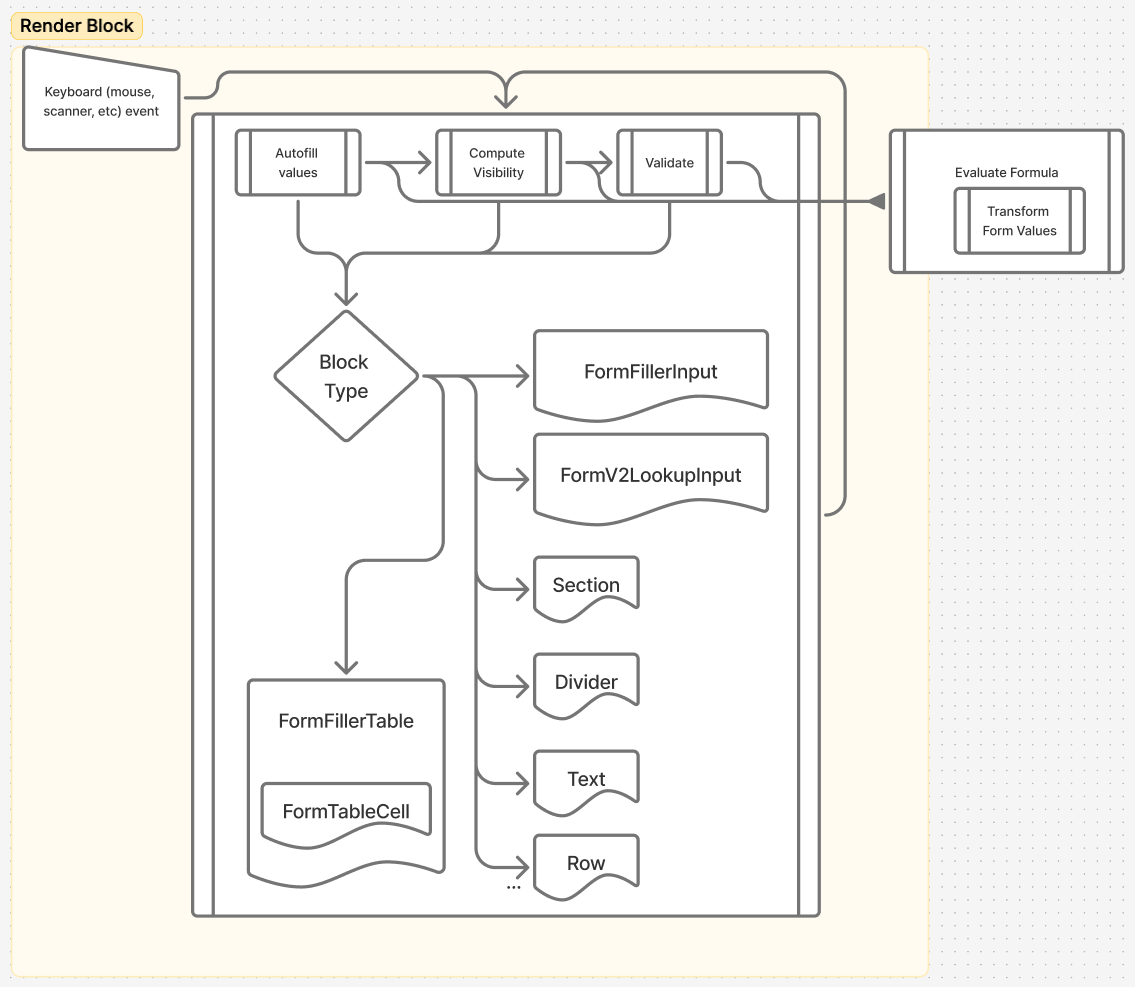
Once the system was correct and we had a growing suite of ‘this must stay true’ tests, we could finally measure real bottlenecks — only then did it make sense to pay the extra time and architectural complexity for speed.
Phase 2: Gotta Go Fast - Architecting For Performance

As my colleague Emilie put it, measure first! I won’t go into detail on the process here — check out Emilie’s fantastic post on the topic if you’re curious; the process is almost identical here.
To know where to start, we need a test form for collection of profiling data. Let’s set up a form that hits all of the expensive features (particularly chained autofills and validations) in a way that was fairly fast to test.
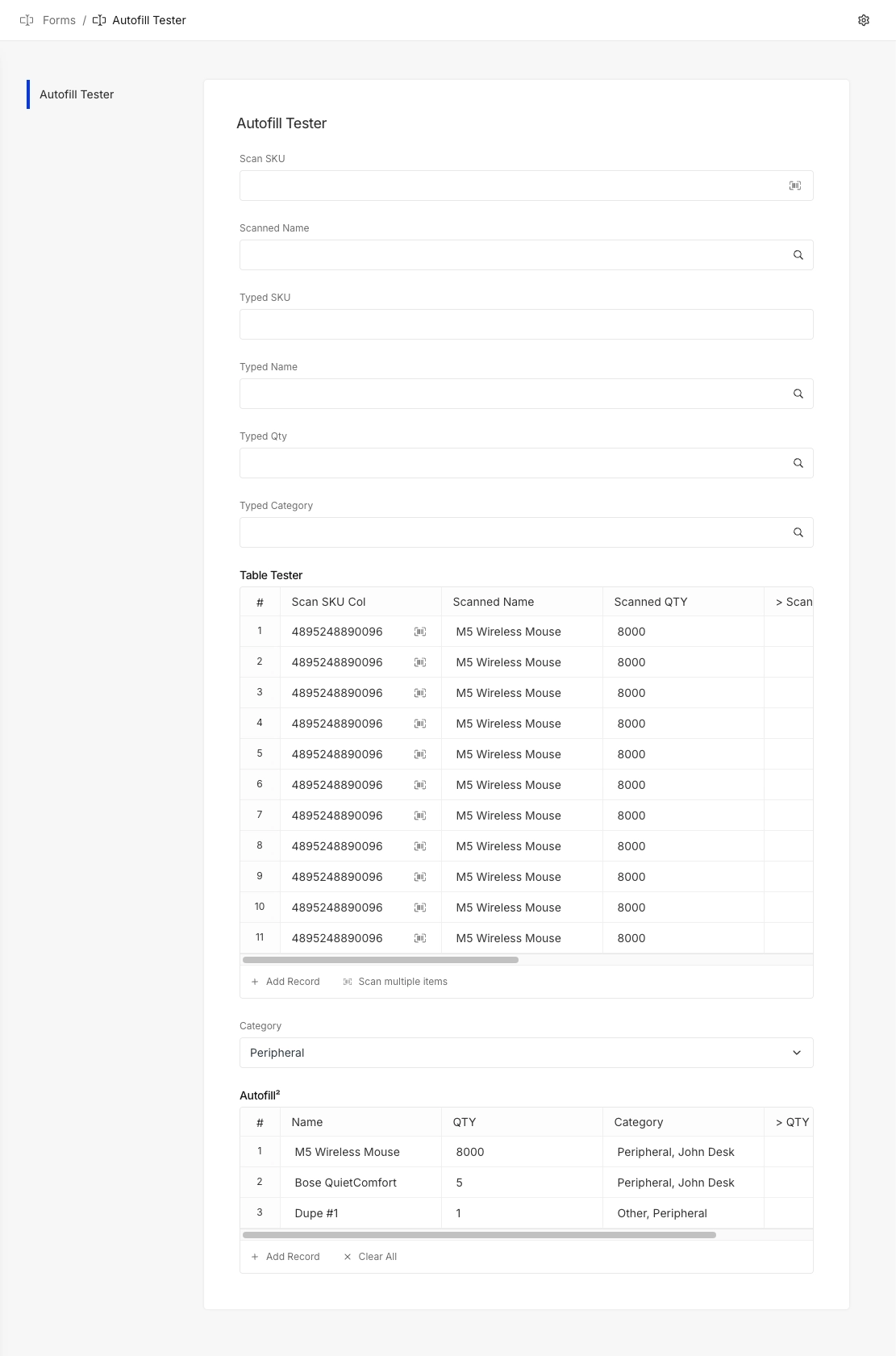
Now let’s start our profiler and type into the Scan SKU Col, which will trigger queries to autofill further columns, validations, and cascading second order validations, etc.
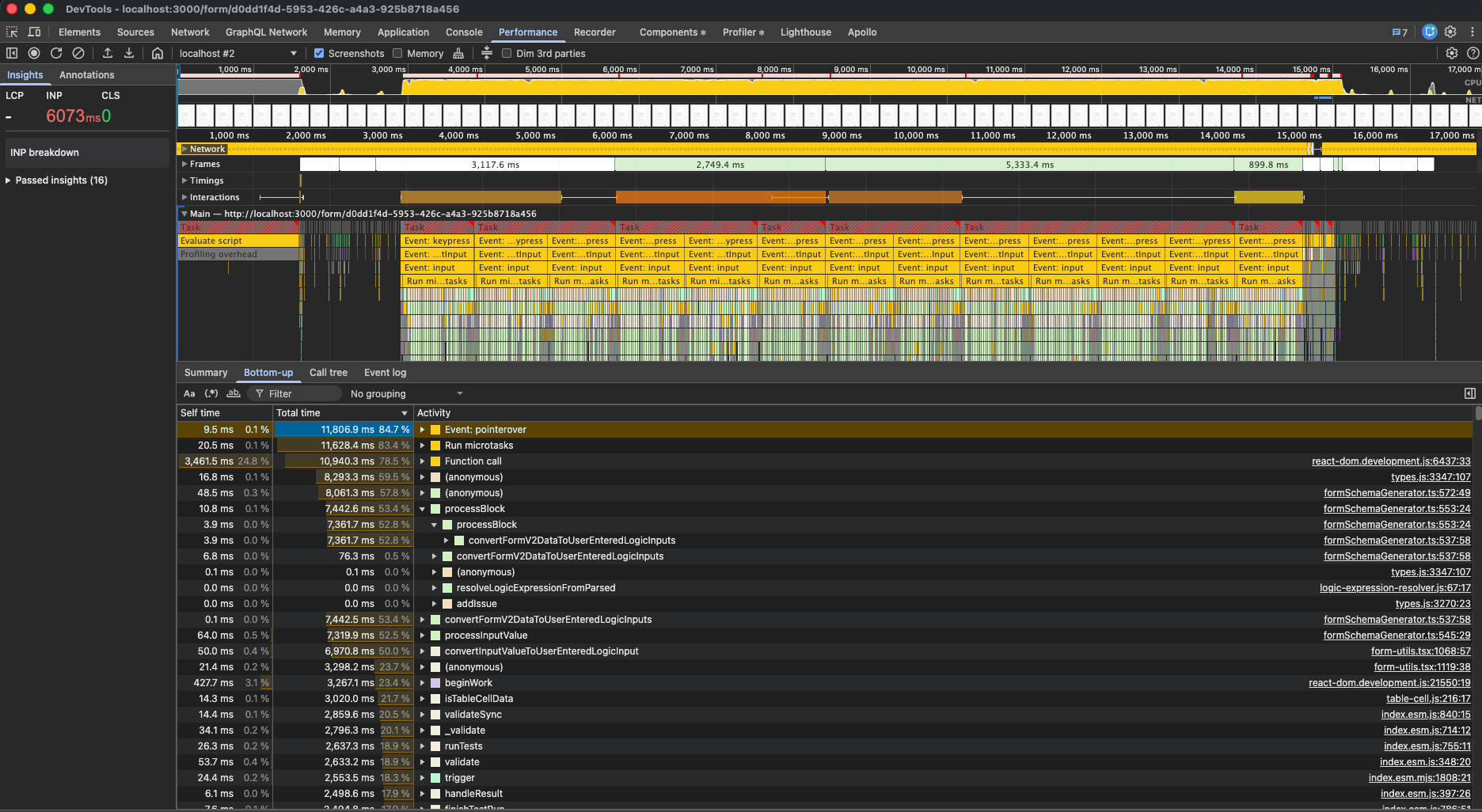
Yikes, the result is continuous max CPU usage with multi-second freezes between keystrokes. It wasn’t just that every input triggered a re-render; it often triggered a cascade on complex forms using a combination of the new features. Nothing that is slowing down admins on implementation and User Acceptance Testing (the test form is purposely contrived; performance is less critical here), but certainly something that would slow down a user processing at speed (in a warehouse for example).
Armed with our performance data, we can put together an optimization strategy and design an optimized architecture.
- Optimize heavy util/helper functions
- If these are called a lot, small optimizations can build up to significant gains
- Unit tests are the easiest to write and maintain, so we have great coverage and can iterate here more rapidly
- Reduce re-renders and wasted work through re-architecture: Revisit the tools we purposely skipped in the initial build and functionality iteration to identify where they best fit in the system
- This is where we’ll get the biggest speed-ups, but testing is slower and less direct (mostly integration and E2E)
The Architecture
Our new architecture looks something like this: much more complex to build and maintain, but much faster to execute.
_image2b3.png)
The main win here was detaching the business logic from the render cycle.
Previously these effects lived in React effects derived from state, so updates cascaded through render. Now, it is all moved into a single subscription pipeline to centralize scheduling, caching, and commits.
- Immediate:
- Track changed fields and update caches
- Manage debounce timers
- Debounced: The slow and latency-tolerant steps
- fetching async data
- autofill
- validation
- computing visibility
To optimize the operations done in each of these parts, we spend a little memory to reduce compute by building some useful data structures.
- Dependency Maps: For validation, autofill, and visibility — what are the dependencies between different blocks?
- If the relationship map is incomplete, its not a big deal as we’ll fill it in on the next debounce + render cycle.
- Only re-compute affected blocks rather than recomputing the entire form on every change.
- User Entered Logic Values Cache: All field values transformed into final shape and stored in cache.
- Instead of transforming on-demand for each execution, read from the cache and only transform if cache entry is missing.
- Reduces repeated parsing/shape conversion and cuts allocations.
💡 Where to Store Data: State or Ref?
- State: Trigger re-renders
- Ref: Immediate business logic, “Eventually correct” is fine for UI
- Use refs to implement the cache’s in your architecture. We’ll read from them when rendering, but we generally shouldn’t trigger an entire re-render just because we updated a cache entry
- When ready for a re-render, update your Source of Truth state atomically to trigger a single re-render. Even better, do this debounced to only re-render at a rate that is necessary for your app to feel responsive.
- Event loop overload and lag will always feel worse than a rock-solid consistent 50-200ms delay.
💡 Single Thread, But Non-Blocking?
- React transitions can help delay/batch rendering to favor interactivity responsiveness.
In Phase 1 we avoided refs and debouncing not because they’re inherently “bad” or anti-patterns, but because they introduce timing/consistency challenges that are expensive to iteration before behavior is stable. Phase 2 is when these tools become worth it as we transition from behavior to performance.
At every step, test against the plan: the first iteration defined and proved behavior, so now we have a SoT to test again — unit tests, agentic, human.
Putting this all together, let’s profile again.
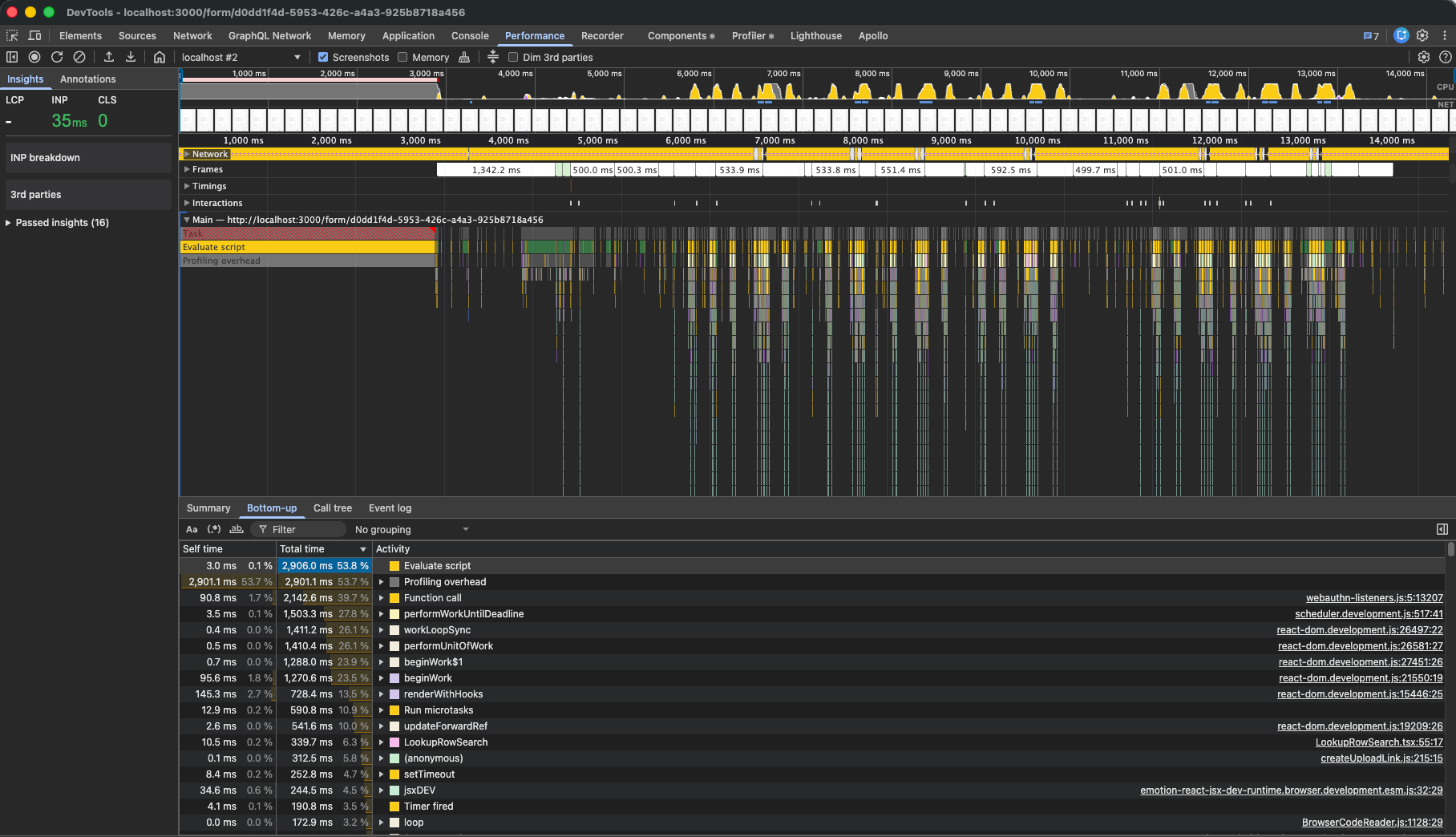
Ahhhhh, much better. The longest a user ever had to wait for feedback ( INP ) was just 35ms, or about 2 frames at 60fps. Without profiling overhead (over 50%) we’re well within budget.
Gotta Learn Fast: Closing the Loop
We started with a simple, synchronous, and linear flow that was fast to iterate on, but slow to execute:
Input -> Update state -> React component render owning all business logic -> cascade to update state
In the end, we have a much more complex, but highly responsive architecture:
Input -> lightweight "immediate" business logic, update eventually-correct cache -> schedule heavy work debounced -> atomic render state update and re-render
As DOSS builds to a future where our application UX is as composable and adaptable as our data modeling and workflows, these learnings set us up to tackle these challenges with speed — in development and for the end user. We have both a performant and generalizable framework for user-defined interfaces and the team methodology for quickly prototyping new features in this framework.
There are many more opportunities for optimization still on the table. As just a couple examples:
- Component Library: Our React component library has many layers of components with inefficient rendering cycles. Nothing we do in Forms business logic can solve that and optimizing the number of re-renders only minimizes the problem. Our next generation of components will not only be built with better UX but with performance in mind.
- Formula Evaluation: Formula evaluation underpins most of the core features of Forms 2. Optimizing our formula evaluator would provide broad speedups across all of these features. Moreover, many of the formulas share similar phrases and stems. We may have a conditional visibility If x, show y as well as If !x, show z as well as some validation conditions with x . If x is itself a complex sub-formula to evaluate, we can compute and cache it separately.
Stay tuned for more!
_imagea8e.png)
_image06e.png)