RBAC is hard. Granular RBAC is even harder.
At DOSS, we serve an extremely wide range of customers — from apparel to food & beverage, from small businesses to mid-market. In order to best serve them, the core application is fully composable: a set of primitive building blocks that gives users control of their business’ journey.
However, as Uncle Ben once said, “with great application flexibility comes great responsibility” (or something like that).
Every customer’s DOSS instance looks different: different organization structure, different data sensitivity requirements, and different rules for determining which users can do what functions. A warehouse manager should be able to edit inventory counts but not cost. A salesperson should only see their own deals. An external logistics partner should be able to submit a particular form but not be able to view anything else.
And then there are AI agents.
Suddenly, the stakes for access control go up dramatically. A human who stumbles onto something they shouldn’t see will (hopefully) stop. An AI agent, on the other hand, will not. That means permissions need to be airtight.
Because our permissioning requirements were anything but binary, we needed to figure out a way to easily filter down what each user, human or agent, is allowed to access. We needed a highly sophisticated Role-Based Access Control (RBAC) system.
The Approaches We Considered
We evaluated three different approaches — application-layer filtering, a permissions DSL, and database-layer restrictions — ultimately choosing the database-layer solution for its ability to guarantee security at the source without requiring constant application-level enforcement.
Application-Layer Filtering Everywhere
The default, “naïve” approach would be to add permission checks in every GraphQL resolver, API endpoint, database query, etc.
We quickly ruled that out as a viable option. Maintaining consistent filtering and access patterns across an ever-growing codebase would be impossible. Even the smallest missed application-layer check in the system could be a data leak that would cause significant harm to customers and reputation harm to our reliability.
Permissions DSL (Inspired by Figma)
We found Figma’s permissions article that detailed how they implemented a DSL and boolean logic evaluator. At first glance, it seemed like a great match. Like Figma, we have to handle read vs edit access at a wide range of nested layers. Figma was inspired by AWS, and we consider ourselves to be much like a managed cloud offering. The parallels were powerful!
However, as we dove in deeper, we realized that there were three crucial challenges.
- The DSL has to be invoked at every point the application touched the database. That leads to 2 possibilities: (1) deal with the application-layer filtering challenges mentioned above or (2) create a governing layer for all system access.
- Policy evaluation at scale has significant performance implications. For example, it could introduce event loop lag and degrade performance for users since Node’s single event loop is great at I/O, but terrible at CPU-bound logic.
- The policy engine does not play nicely with pagination. You’d need to repeatedly fetch a batch, filter it in memory, and check if the page is full and then repeat until you have a full page.
At its core, the biggest difference between Figma and DOSS is that our data is tabular. Ultimately, we are surfacing filtered tables rather than arbitrarily defined resources. A DSL can definitely be used for this, but it felt like an over-engineered solution for what we needed in the next period of our growth, especially given the timeline and personnel constraints of a fast-moving startup.
Database-Layer Restrictions
Because of the tabular nature of our system, we realized we could rely on preexisting database-layer policy concepts without reinventing the wheel. Specifically, all our customer data is surfaced using Postgres and Elasticsearch.
We can write Postgres Row Level Security (RLS) policies without having to use native Postgres users. Postgres can enforce access policies directly on every query without the application code needing to be aware of it. For data in Elasticsearch, the same principle can be applied by using Document Level Security (DLS) and Field Level Security (FLS).
Most importantly, securing the data at the database layer itself guarantees that an AI agent can’t ever make use of backdoor mistakes in the application layer. The database simply will not surface disallowed information.
_image290.png)
So, how does it work?
Postgres Read Layer
We built a comprehensive RLS system by leveraging Postgres for schema-level access control and Elasticsearch DLS and FLS for tabular data — ensuring that permissions are enforced at the database layer itself, not in application code.
Postgres Row Level Security
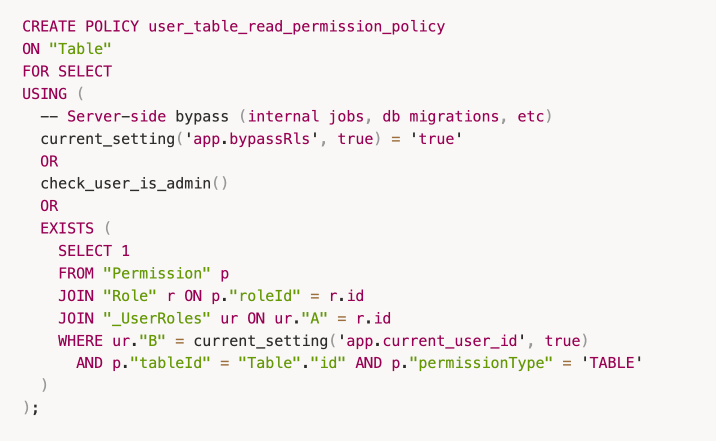
Postgres’s RLS lets you attach a USING expression to any table. Every SELECT on that table automatically has this expression applied as an implicit WHERE clause that is enforced by the database engine itself, before any data reaches the application layer.
Furthermore, instead of using Postgres’s native user system, we created a Prisma extension that sets the user’s ID in a Postgres transaction for every query. The RLS policies use that to determine what the user can see.
Here’s a sample read policy. Every table access is checked against this before returning data.
Two Postgres Users
Our existing Postgres user is a superuser, so it automatically bypasses all RLS. We created a new user with SELECT, INSERT, UPDATE, and DELETE privileges on all tables, but without superuser privileges, and configured the core user backend service to use it. All internal maintenance services continue using the superuser and are never subject to RLS.
The Prisma extension
We use Prisma as our ORM (Object-Relational Mapping) provider.
For every query, we need to set the current_user_id to be the authenticated user’s ID, so that the RLS policy can check the user’s permissions. We do this with a custom Prisma extension that wraps every query in a transaction.
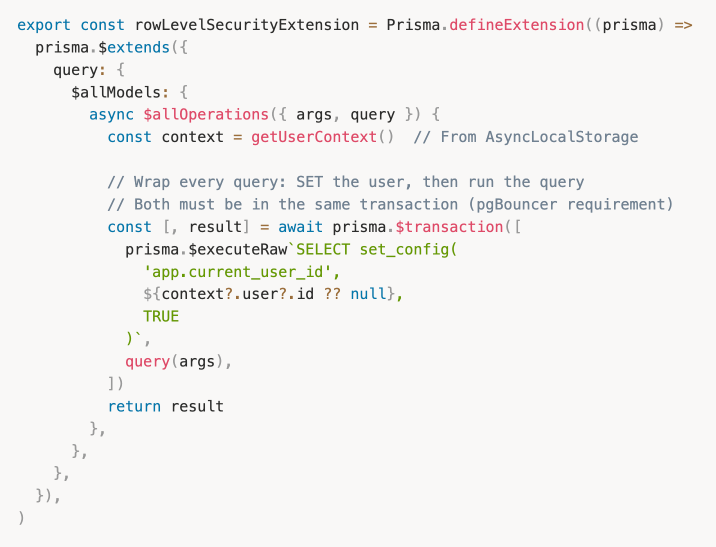
The TRUE flag on set_config is critical because it scopes the config variable to the current transaction only, so it is automatically cleared when the connection returns to the PgBouncer pool. This is necessary if you use your own connection pool, i.e. we use PgBouncer with transaction-mode pooling. Since connections are shared across requests, a lingering current_user_id from a previous request could be the cause of a data leak.
The DataLoader Problem
Wrapping every Prisma query in a transaction to set the user ID introduced an unexpected complication: Prisma’s native query batching stopped working.
Prisma batches queries by grouping them under the same batch ID. But when each query is wrapped in its own transaction, each one gets a unique batch ID so Prisma is unable to group them. Without batching, nested resolvers that resolve a field across many parent objects will fire N separate queries instead of a single batched one. The performance implications are significant.
The solution: we codegen’d DataLoader implementations for all nested resolvers.
DataLoaders now batch multiple requests for the same data into a single query. Since these are generated from our schema, any new relation automatically gets a DataLoader without requiring any additional manual work.
Elasticsearch Read Layer
Postgres RLS gave us airtight access control for all our schema-level objects. But at DOSS, actual tabular data is often served from Elasticsearch. RLS doesn’t touch Elasticsearch. We needed to solve row-level and field-level access there as well.
Before settling on a solution, we considered two naive approaches that we quickly ruled out.
- Denormalize and store the IDs of the roles that have access to some row. Then the search request would supply the user role in the request to filter matched rows. This would require additional work when writing a new row, and re-denormalization of all data when the permissions associated with a role change.
- Build an Elasticsearch filter that unions the individual filters defined across the queries that a role has access to, and include that filter when fetching lookup data. This makes Elasticsearch queries much more complex to write, and adds the risk of hitting the max clause count.
Neither of these solutions were feasible.
Bridging RLS and DLS/FLS
The right answer was already built into Elasticsearch. Since we run a managed Platinum-tier deployment, we had access to two native features purpose-built for exactly this problem:
- Document Level Security (DLS): filters which documents (in our case, rows) a user can see
- Field Level Security (FLS): limits which fields (in our case, columns) are returned in a document
The result is a unified permission model: we can convert our Postgres permissions into the corresponding Elasticsearch representations.
RBAC in Elasticsearch requires setting up two components:
- Authentication: how an Elasticsearch API request is identified and associated with a known user entity
- Authorization: how the data within that Elasticsearch API’s response is filtered to what that authenticated user is allowed to access
Authentication: JWT Realm + Firebase Custom Claims
Previously, all Elasticsearch requests from the DOSS backend used a single elastic superuser. To enforce DLS and FLS, Elasticsearch needs to know who is making each request. We solved this with Elasticsearch’s jwt realm, which validates Firebase JWTs directly. These are the same tokens that users already send with every API request.
The remaining piece is informing Elasticsearch of what roles a JWT user belongs to. We use Firebase Custom Claims for this. When a user’s roles change in DOSS, we write a roles array (containing the UUID for each DOSS Role) into their Firebase token. The Elasticsearch jwt realm is configured to read this claim and map each role UUID to the corresponding Elasticsearch role definition.
With the realm configured, a single Role Mapping rule handles the rest. Any user authenticated via the firebase-jwt realm is automatically assigned to the Elasticsearch roles listed in their token’s groups claim (which are the DOSS Role UUIDs)
User Authorization
Once a user has been authenticated, the next step is to determine whether the user has access to the resource being queried in the API request, and what data within that resource the user is allowed to access.
For ADMIN roles, the index privileges will always be set to ["read"] to enable those users to always allow access to all the data in that index.
For the purposes of access control within DOSS for the remaining roles, we configure the DLS and FLS as follows:
The query parameter in the index privileges can be set to filter which documents of that index the role has access to. Any documents that match the query from an authenticated user with that role will also need to match the filters defined in the query parameter.
The field_security parameter in the index privileges can be set to indicate what fields within that index to grant or deny access to. By default, we set grant: ['*'] to enable the role to access all the row metadata fields in the document. For fields of that table that the role has been granted access to, the default grant setting will enable reading the data in the cells of that column. For any remaining columns, the except setting will be enumerated with the remaining columns of that table.
What about Writes?
RLS, FLS, and DLS handle all application reads. However, for modifications like inserting table rows or updating individual table cells, we needed a different solution.
My colleague wrote a great explainer on The Power of Codegen . Rather than building a full data governance layer from day 1, we decided our Phase 1 solution could make use of GraphQL directives and downstream codegen.
At its core, we use 2 primary mechanisms:
- Every single endpoint for our GraphQL server must implement an authorization check that is blocked on review by our security team. This doesn’t scale perfectly, but it does enforce intentional verification of authz decisions. The authz check is stubbed by the codegen so it cannot be forgotten.
- We use GraphQL directives to set up the codegen and grant safe defaults to endpoints.
By default, an endpoint cannot be accessed by anyone. Directives and authz implementation decisions are enforced to opt in access rather than opt out.
An ERP is the single most important system our customers will have in their business suite. We can’t allow for even the slightest miss on permissioning systems, and therefore, must build comprehensively from day 1.
Don’t Trust the Application Layer
If we had to distill this down to one lesson: don't trust the application layer to be your last line of defense. Application code gets refactored, new endpoints get added, agents compose queries in ways no one anticipated.
The database doesn't have those problems. Pushing enforcement to Postgres and Elasticsearch meant we could ship RBAC in under a month, onboard enterprise customers with confidence, and let our engineers write new features without RBAC being a constant concern. The complexity is real (policies, transactions, dataloaders, role syncing, etc.), but it's complexity that lives in one place and stays there.
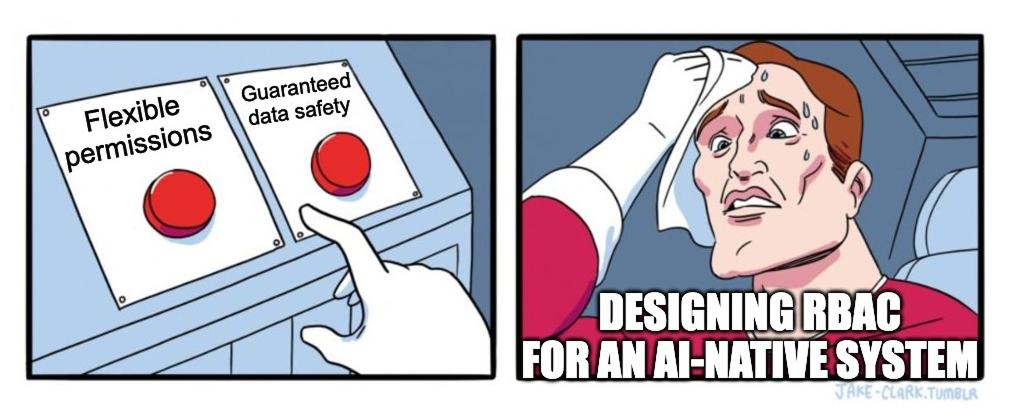
The world of agentic development is constantly changing, which is why we call this our Phase 1 solution. We have to stay agile and ahead of the next generation of systems. We’ll revisit this for Phase 2 sometime soon.
_imagea8e.png)
_image06e.png)